
Blueprint Helper Nodes
Vertex Animation Studio includes a Blueprint Function Library with simplified nodes for common animation tasks. These nodes are organized into two categories based on the component type you’re working with.
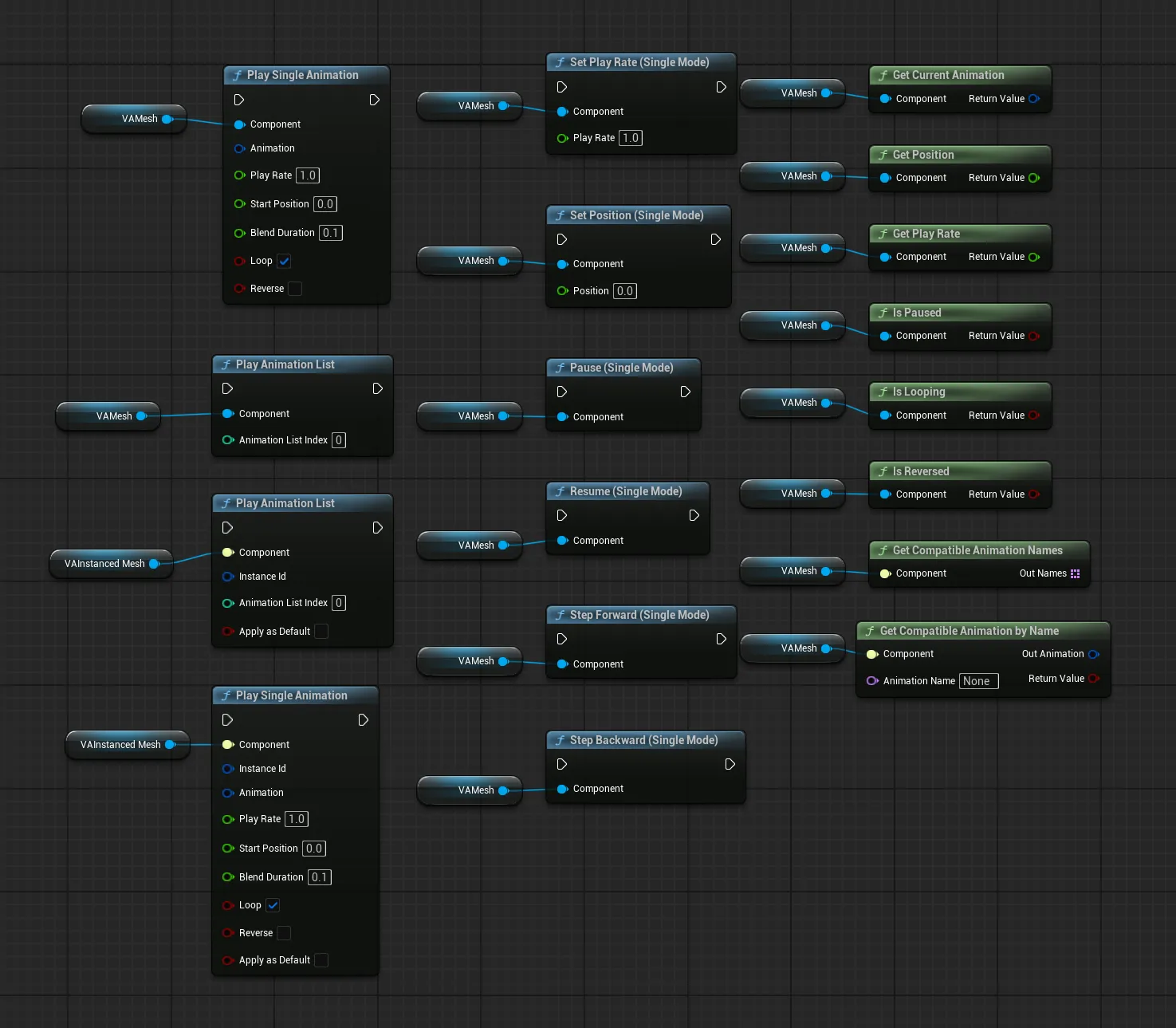
UVAMeshComponent Nodes
Section titled “UVAMeshComponent Nodes”Found under Vertex Animation | Mesh in the Blueprint action menu.
Play Single Animation
Section titled “Play Single Animation”Plays a single animation on the component.
- Component: The UVAMeshComponent
- Animation: The animation to play (FVACompatibleAnimation)
- Play Rate: Playback speed multiplier (default 1.0)
- Start Position: Where to begin in the animation (default 0.0)
- Blend Duration: Time to blend from the current animation (default 0.1)
- Loop: Whether to loop (default true)
- Reverse: Play backwards (default false)
Play Animation List
Section titled “Play Animation List”Starts an animation list on the component by index. Animation lists are configured on the component’s details panel.
- Component: The UVAMeshComponent
- Animation List Index: Index of the animation list to play
Set Play Rate (Single Mode)
Section titled “Set Play Rate (Single Mode)”Changes the playback speed of the current animation. Only works in Single Animation mode.
- Component: The UVAMeshComponent
- Play Rate: New speed multiplier (default 1.0)
Set Position (Single Mode)
Section titled “Set Position (Single Mode)”Jumps to a specific time in the current animation.
- Component: The UVAMeshComponent
- Position: Time in seconds to jump to
Pause (Single Mode)
Section titled “Pause (Single Mode)”Pauses the current animation.
- Component: The UVAMeshComponent
Resume (Single Mode)
Section titled “Resume (Single Mode)”Resumes a paused animation.
- Component: The UVAMeshComponent
Step Forward (Single Mode)
Section titled “Step Forward (Single Mode)”Advances the animation by one frame.
- Component: The UVAMeshComponent
Step Backward (Single Mode)
Section titled “Step Backward (Single Mode)”Steps the animation back by one frame.
- Component: The UVAMeshComponent
Get Current Animation
Section titled “Get Current Animation”Returns the currently playing animation. Returns an animation with INDEX_NONE if nothing is playing.
- Component: The UVAMeshComponent
- Return Value: FVACompatibleAnimation
Get Position
Section titled “Get Position”Returns the current playback position in seconds.
- Component: The UVAMeshComponent
- Return Value: Float
Get Play Rate
Section titled “Get Play Rate”Returns the current playback speed.
- Component: The UVAMeshComponent
- Return Value: Float
Is Paused
Section titled “Is Paused”Returns true if the animation is currently paused.
- Component: The UVAMeshComponent
- Return Value: Boolean
Is Looping
Section titled “Is Looping”Returns true if the current animation is set to loop.
- Component: The UVAMeshComponent
- Return Value: Boolean
Is Reversed
Section titled “Is Reversed”Returns true if the animation is playing in reverse.
- Component: The UVAMeshComponent
- Return Value: Boolean
Generic Nodes
Section titled “Generic Nodes”Found under Vertex Animation | Generic in the Blueprint action menu.
Get Compatible Animation Names
Section titled “Get Compatible Animation Names”Returns all animation names available on the component’s asset collection.
- Component: Any VA component
- Out Names: Array of Names
Get Compatible Animation by Name
Section titled “Get Compatible Animation by Name”Looks up an animation by name and returns the matching animation reference.
- Component: Any VA component
- Animation Name: Name to search for
- Out Animation: The matching FVACompatibleAnimation
- Return Value: Boolean (false if name not found)
Play Single Animation (Generic)
Section titled “Play Single Animation (Generic)”Same as the VAMesh version but requires an Instance ID. Used for controlling specific instances in crowds.
- Component: Any VA component
- Instance Id: The specific instance to animate
- Animation: FVACompatibleAnimation
- Play Rate: Playback speed multiplier (default 1.0)
- Start Position: Where to begin in the animation (default 0.0)
- Blend Duration: Time to blend from the current animation (default 0.1)
- Loop: Whether to loop (default true)
- Reverse: Play backwards (default false)
- Apply as Default: Saves this animation state so it persists and plays automatically on load
Play Animation List (Generic)
Section titled “Play Animation List (Generic)”Same as the VAMesh version but requires an Instance ID and Apply as Default option.
- Component: Any VA component
- Instance Id: The specific instance
- Animation List Index: Index of the animation list
- Apply as Default: Saves this list assignment so it persists on load
See Also
Section titled “See Also”- Animation Control - Detailed animation mode system and direct mode object access
- Custom Animation Lists - Create custom animation behaviors
- VA Mesh Component - Single character setup
- VA Instanced Mesh Component - Crowd setup