
State Trees Overview
Animation State Trees bring full state-machine logic to your vertex-animated characters and crowds. If an Animation List is a playlist, a State Tree is a behaviour graph: states, transitions, conditions, and events. They run on Unreal’s StateTree framework.
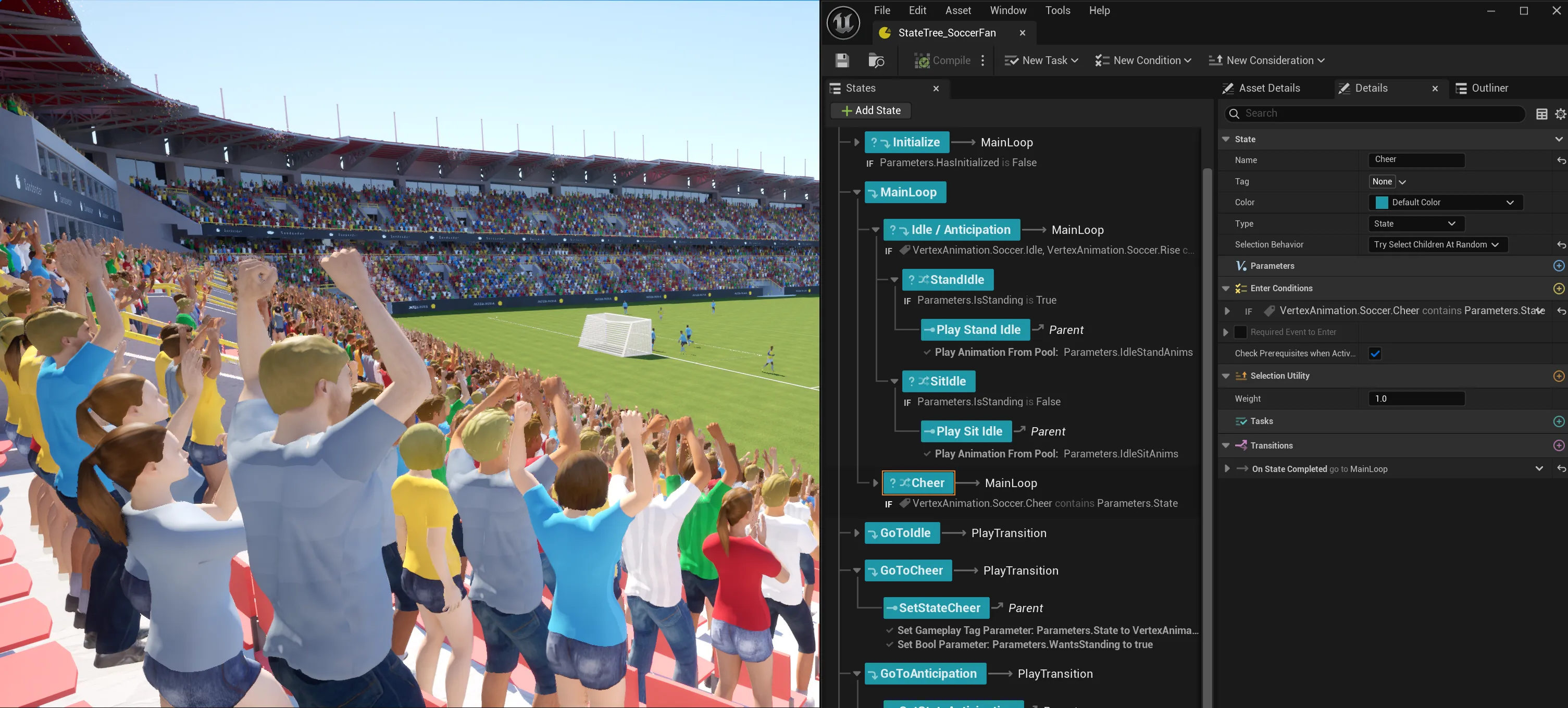
What is a State Tree?
Section titled “What is a State Tree?”A State Tree is an Unreal Engine asset that defines a hierarchy of states, each containing one or more tasks. Transitions between states can fire on animation completion, on elapsed time, or in response to gameplay-tagged events.
Vertex Animation Studio ships its own StateTree schema called the VA StateTree Schema, along with a set of VA-specific tasks, conditions, and evaluators. Because the schema restricts nodes to ones that understand the VA instance system, every task runs efficiently against the plugin’s batched animation update pipeline.
In this version (1.2): State Trees are the recommended way to build animation behaviours that need branching logic, events, or conditional transitions. For simple looping, random, or sequenced playback, keep using Animation Lists.
When to use State Trees vs Animation Lists
Section titled “When to use State Trees vs Animation Lists”| Use Animation Lists for… | Use State Trees for… |
|---|---|
| Single animation playback | Branching logic (idle → wave → cheer) |
| Random selection from a pool | Event-driven transitions (trigger on gameplay tag) |
| Fixed sequences | Conditional transitions (check state, parameters) |
| The lightest possible animation setup | Sharing complex behaviours across many instances |
Both systems can coexist. An actor using a VA Mesh Component can switch to a State Tree only when it needs one; crowds in the Crowd Editor can paint subsets with different State Trees.
Key Concepts
Section titled “Key Concepts”Schema
Section titled “Schema”Every State Tree selects a schema when it is created. Vertex Animation Studio uses the VA StateTree Schema, which restricts the available nodes to VA-compatible Tasks, Conditions, and Evaluators and binds each instance’s runtime data into the tree’s execution context.
States
Section titled “States”A State is a named container that holds one or more Tasks. The tree begins in its root state and traverses into children based on transitions. Only one leaf state is active per instance at a time.
Tasks are the actions a state performs. VA provides tasks for playing specific animations, picking randomly from a pool, setting parameters, and rolling random booleans. See the Tasks Reference for every built-in task.
Transitions
Section titled “Transitions”Transitions move an instance from one state to another. They can fire on state completion (useful for chaining one-shot animations) or on a gameplay-tagged event broadcast from Blueprints or C++.
Events
Section titled “Events”State Trees respond to events broadcast through a gameplay tag. Any Blueprint or C++ caller can broadcast on a VA Mesh Component using one of three nodes:
Broadcast Anim Event(all instances),Broadcast Anim Event With Instances(a specific subset), orBroadcast Throttled Event(rate-limited). Every state listening for that tag will react. This is how you wire external gameplay (triggers, overlaps, scoring) into your crowd animations. See Triggering Events for the full API.
The Runtime Pipeline
Section titled “The Runtime Pipeline”- Authoring: A State Tree asset is created with the VA Schema. Tasks, conditions, and transitions are defined in the StateTree editor.
- Assignment: A VA Mesh Component or a Crowd Editor brush assigns the State Tree to one or many instances.
- Execution: Each instance runs its own copy of the tree state. Transitions and tasks process on a configurable thread, batched with other instance updates.
- Events: Gameplay code broadcasts events by tag; the schema routes them to every listening state.
What’s Next
Section titled “What’s Next”- Walk through the shipped Soccer Fan tree in Creating a State Tree Example.
- Browse the Tasks Reference for every built-in node.
- Learn how to drive transitions from gameplay in Triggering Events.
- Configure global behaviour in Schema & Settings.