
Custom Data Float Nodes
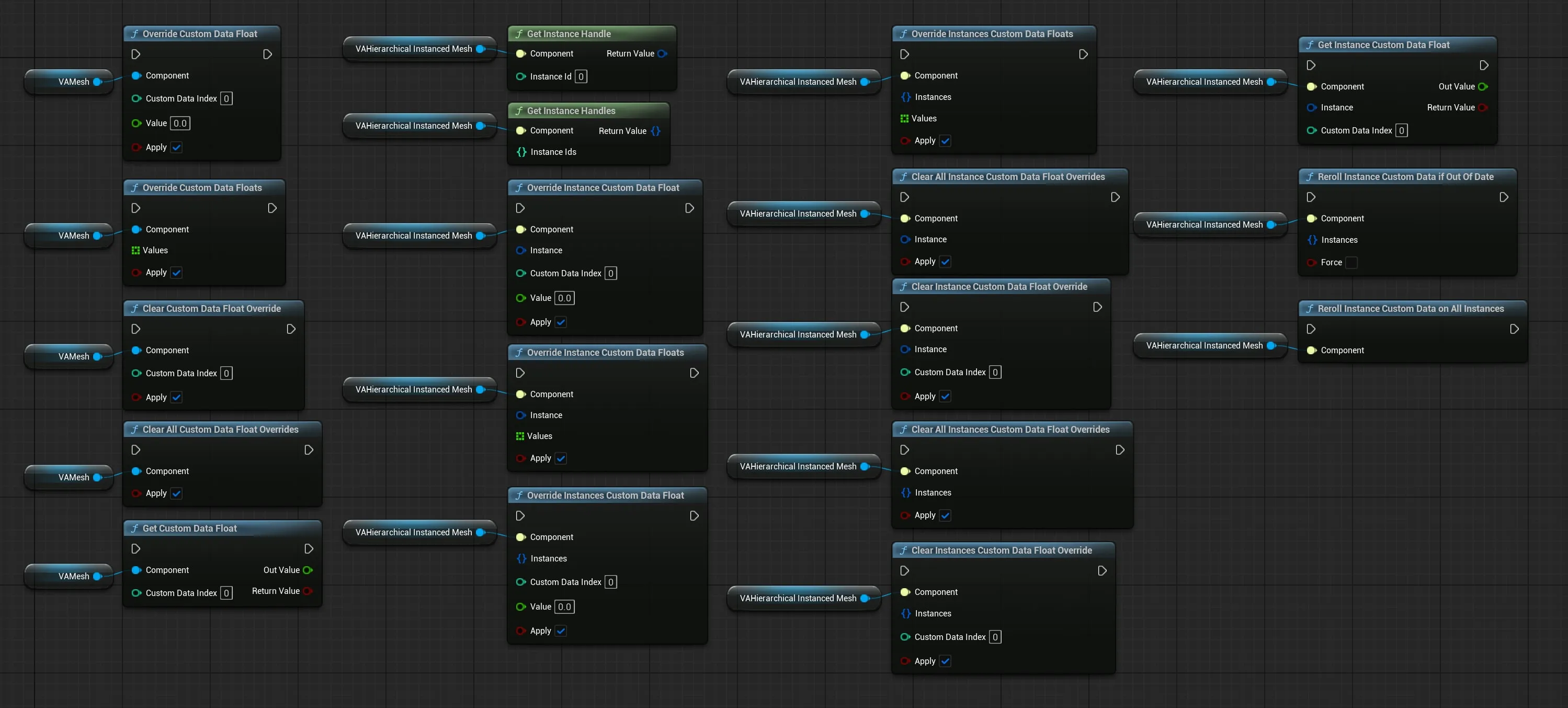
These Blueprint nodes let you read and override the per-instance custom data floats that drive material variation. Use them to override the randomized value an asset normally generates, for example forcing a specific colour, swatch, or numeric ID on a particular instance.
For the underlying concept and how to wire custom data into a material, see Custom Data - Instance Variations.
Concepts
Section titled “Concepts”Absolute vs. User Slot Indices
Section titled “Absolute vs. User Slot Indices”Custom data slots are addressed by absolute index, matching the index used in your material’s Per Instance Custom Data node:
- Indices 0–11 are reserved by the plugin (animation state, blending, etc.). Don’t write to these.
- Indices 12+ are the user slots you configure in the asset’s Per Instance Custom Data list.
User Overrides and Reroll
Section titled “User Overrides and Reroll”Each instance tracks which slots have been user-overridden:
- Calling an override node marks the touched slot(s) as user-overridden. Subsequent rerolls will not clobber them.
- Calling a clear node removes the override flag and rerolls the slot from the asset’s configured range.
This means once you Override Custom Data Float on an instance, that value sticks until you explicitly clear it or override it with a new value.
The Apply Pin
Section titled “The Apply Pin”Every override and clear node accepts an Apply boolean (default true). The pin only controls when the renderer is updated. The saved value is written immediately either way:
Apply= true: writes the new value and pushes it to the renderer in the same call. For instanced components this updatesPerInstanceSMCustomData; for non-instanced (VAMesh) components it updates material scalar parameters.Apply= false: writes the new value but skips the renderer update. The change is staged on the instance and will be picked up the next time something triggers a reapply.
Stacking Writes for Performance
Section titled “Stacking Writes for Performance”Each call with Apply set to true triggers a renderer push, which is wasted work if you’re about to make several more changes in a row. The cheaper pattern is to stack writes with Apply off, then enable Apply on the final call. That final call’s reapply will include every prior staged change.
For example, applying three overrides to a single VAMesh:
- Call Override Custom Data Float (Index 12, Value 0.7) with Apply = false
- Call Override Custom Data Float (Index 13, Value 1.0) with Apply = false
- Call Override Custom Data Float (Index 14, Value 0.25) with Apply = true
All three values land on the instance, but the renderer only gets updated once.
UVAMeshComponent Nodes
Section titled “UVAMeshComponent Nodes”Found under Vertex Animation | Mesh in the Blueprint action menu.
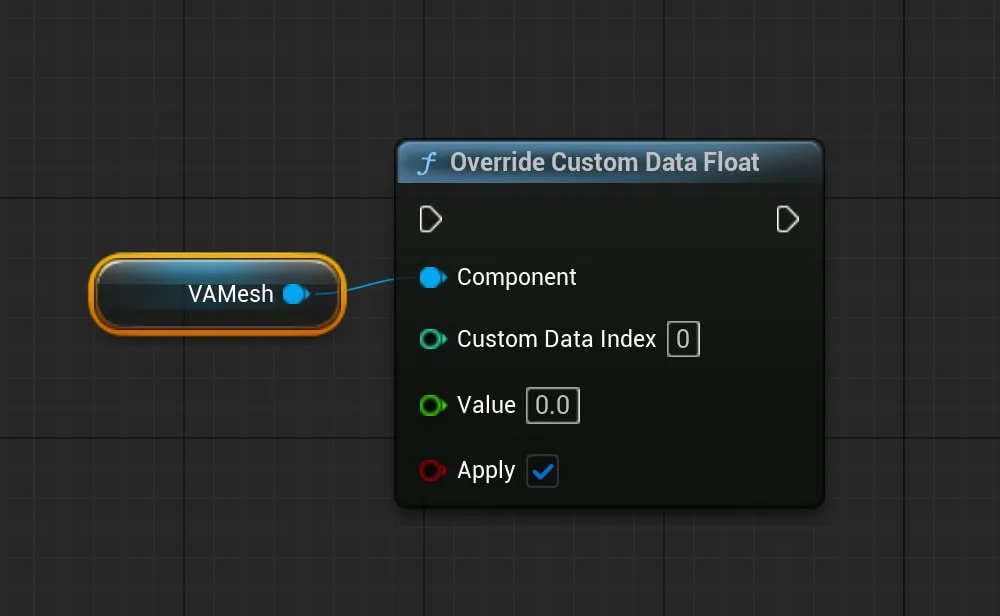
Override Custom Data Float
Section titled “Override Custom Data Float”Sets one custom data slot on the mesh and marks it as user-overridden so reroll won’t clobber it.
- Component: The UVAMeshComponent
- Custom Data Index: Absolute material-side index (user slots start at 12)
- Value: New float value
- Apply: Push the change to the renderer immediately (default true)
Override Custom Data Floats
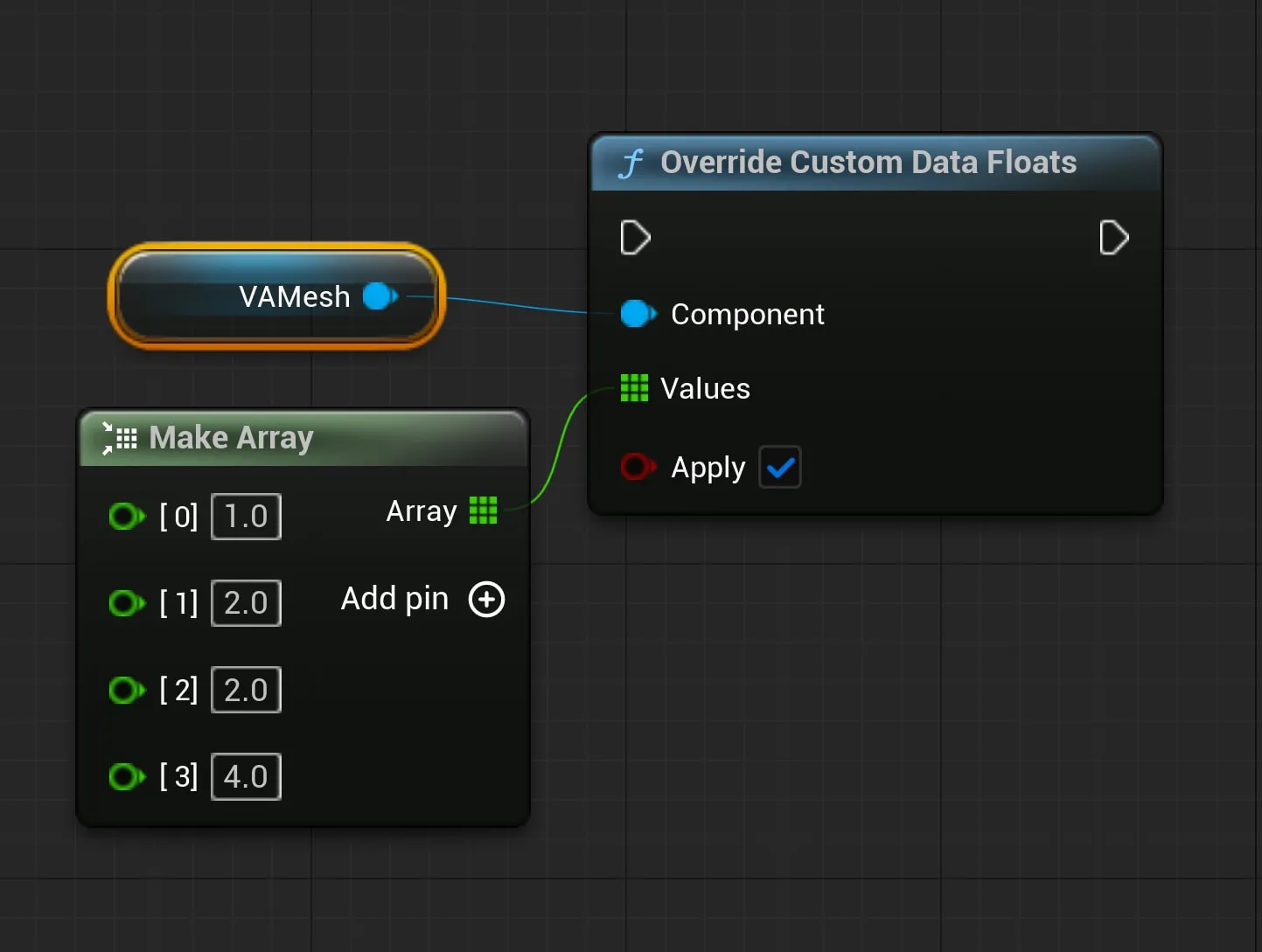
Section titled “Override Custom Data Floats”Sets multiple user custom data slots on the mesh in one call. The array is indexed from the first user slot, so
Values[0]maps to the first user slot,Values[1]to the second, and so on.
- Component: The UVAMeshComponent
- Values: Array of float values, one per user slot
- Apply: Push the change to the renderer immediately (default true)
Clear Custom Data Float Override
Section titled “Clear Custom Data Float Override”Removes the user-override flag for the given slot and rerolls that slot from the asset’s configured range.
- Component: The UVAMeshComponent
- Custom Data Index: Absolute material-side index
- Apply: Push the change to the renderer immediately (default true)
Clear All Custom Data Float Overrides
Section titled “Clear All Custom Data Float Overrides”Removes all user-override flags on the mesh and rerolls every slot from the asset’s configured ranges.
- Component: The UVAMeshComponent
- Apply: Push the change to the renderer immediately (default true)
Get Custom Data Float
Section titled “Get Custom Data Float”Reads the currently-stored custom data float from the mesh.
- Component: The UVAMeshComponent
- Custom Data Index: Absolute material-side index
- Out Value: The current float value
- Return Value: Boolean (false if the index is invalid)
Generic Nodes
Section titled “Generic Nodes”Found under Vertex Animation | Generic in the Blueprint action menu.
Override Instance Custom Data Float
Section titled “Override Instance Custom Data Float”Sets one custom data slot on a single instance and marks it as user-overridden.
- Component: Any VA component
- Instance: Handle of the instance to modify
- Custom Data Index: Absolute material-side index
- Value: New float value
- Apply: Push the change to the renderer immediately (default true)
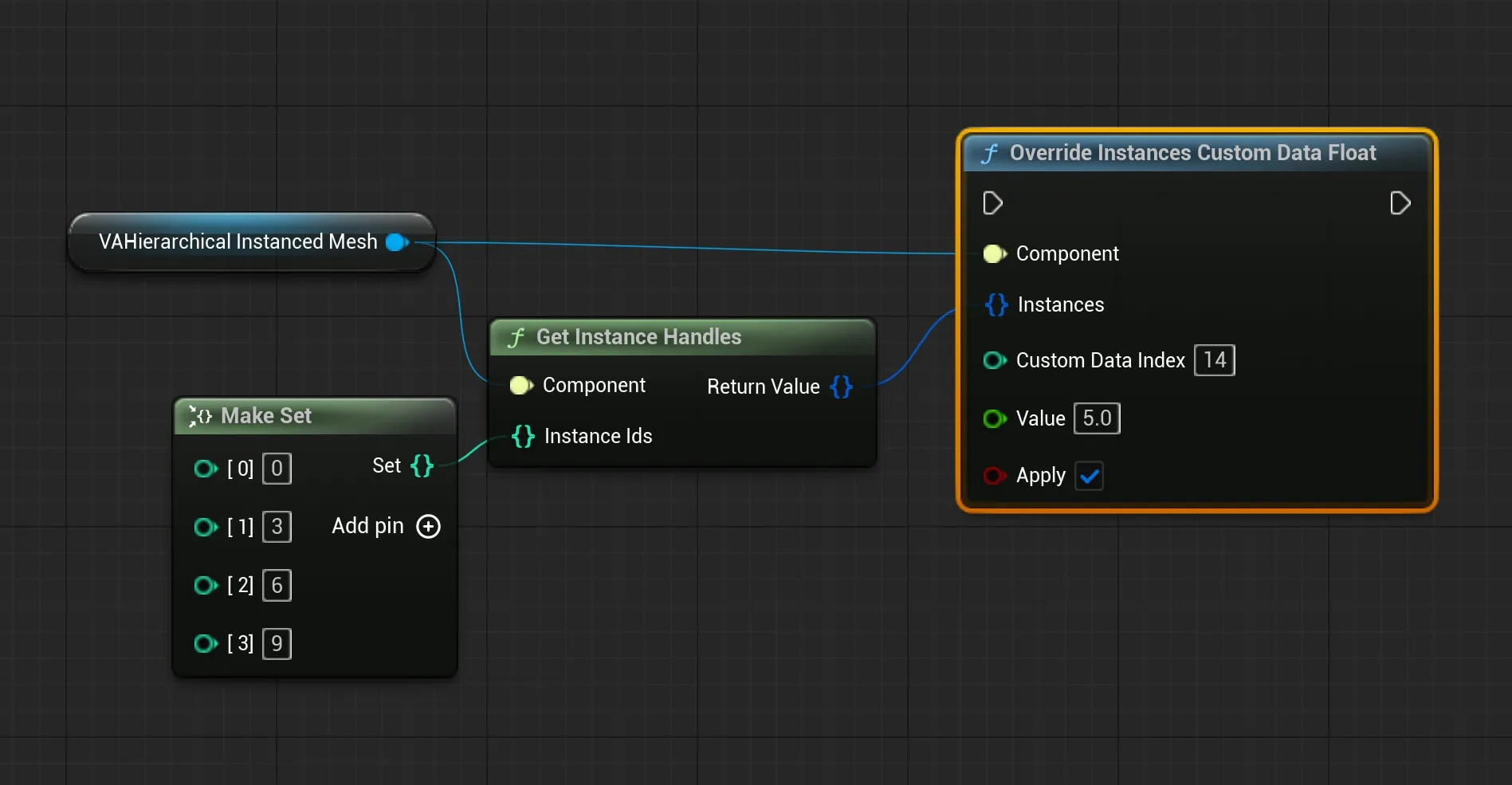
Override Instances Custom Data Float
Section titled “Override Instances Custom Data Float”Batch variant. Sets the same slot to the same value across many instances. The reapply pass runs once after all writes.
- Component: Any VA component
- Instances: Set of instance handles
- Custom Data Index: Absolute material-side index
- Value: New float value
- Apply: Push the change to the renderer immediately (default true)
Override Instance Custom Data Floats
Section titled “Override Instance Custom Data Floats”Sets multiple user slots on a single instance from an array.
Values[0]maps to the first user slot,Values[1]to the second, etc.
- Component: Any VA component
- Instance: Handle of the instance to modify
- Values: Array of float values, one per user slot
- Apply: Push the change to the renderer immediately (default true)
Override Instances Custom Data Floats
Section titled “Override Instances Custom Data Floats”Batch variant. Sets multiple user slots from an array across many instances at once.
Values[0]maps to the first user slot,Values[1]to the second, etc.
- Component: Any VA component
- Instances: Set of instance handles
- Values: Array of float values, one per user slot
- Apply: Push the change to the renderer immediately (default true)
Clear Instance Custom Data Float Override
Section titled “Clear Instance Custom Data Float Override”Removes the user-override flag for one slot on one instance and rerolls that slot.
- Component: Any VA component
- Instance: Handle of the instance to modify
- Custom Data Index: Absolute material-side index
- Apply: Push the change to the renderer immediately (default true)
Clear All Instance Custom Data Float Overrides
Section titled “Clear All Instance Custom Data Float Overrides”Removes all user-override flags on one instance and rerolls every slot.
- Component: Any VA component
- Instance: Handle of the instance to modify
- Apply: Push the change to the renderer immediately (default true)
Clear Instances Custom Data Float Override
Section titled “Clear Instances Custom Data Float Override”Batch variant. Clears one slot’s override on many instances and rerolls.
- Component: Any VA component
- Instances: Set of instance handles
- Custom Data Index: Absolute material-side index
- Apply: Push the change to the renderer immediately (default true)
Clear All Instances Custom Data Float Overrides
Section titled “Clear All Instances Custom Data Float Overrides”Batch variant. Clears every override on many instances and rerolls every slot.
- Component: Any VA component
- Instances: Set of instance handles
- Apply: Push the change to the renderer immediately (default true)
Get Instance Custom Data Float
Section titled “Get Instance Custom Data Float”Reads the currently-stored custom data float for one instance.
- Component: Any VA component
- Instance: Handle of the instance to read
- Custom Data Index: Absolute material-side index
- Out Value: The current float value
- Return Value: Boolean (false if the index or instance is invalid)
See Also
Section titled “See Also”- Animation Control Nodes - Blueprint nodes for animation playback control
- Custom Data - Instance Variations - How to set up custom data slots in your material and asset
- VA Mesh Component - Single character setup
- VA Instanced Mesh Component - Crowd setup